
- Written once
- Subject line set
- [Brackets] gone
- Test on her phone
- Scheduled for 9:00
 BulletinRunbuilt on MemberRun
Request access
By requestRequest access
Email newsletters and a news page
Professional bulletins and newsletters without the cost or complexity. Send them to inboxes, and post the same news to your news page.
Best for: Small groups and organizations getting started
Request LaunchPrices in US dollars per month. We set up your account by hand and send your sign-in link.
Subject: Spring concert moves indoors
Doors open at 6:30 in the main hall.
Read moreDoors open at 6:30 in the main hall.
The whole idea
Write the story once. It goes out as the email and stays up as your news page, to one list of people who said yes.
Five jobs, in the order you meet them. They share one list of subscribers and one set of posts, so a change in one is already true in the rest.
Posts with a cover image and a category. Issues built from blocks, with templates, a quick digest of what you published, and a preview before anything goes.
One sheet: audience, now or scheduled, a check, a test to yourself. A double click or a second tab sends once.
A public subscribe page where a typed address proves nothing until the confirm click. Import a CSV with a consent statement.
Published posts appear on a public news page, with a page for each post. A page we host for you, with your posts in it.
Each sent issue opens on a results page: clicks, bounces, complaints, the email as sent. Opens and clicks need your own sending domain.
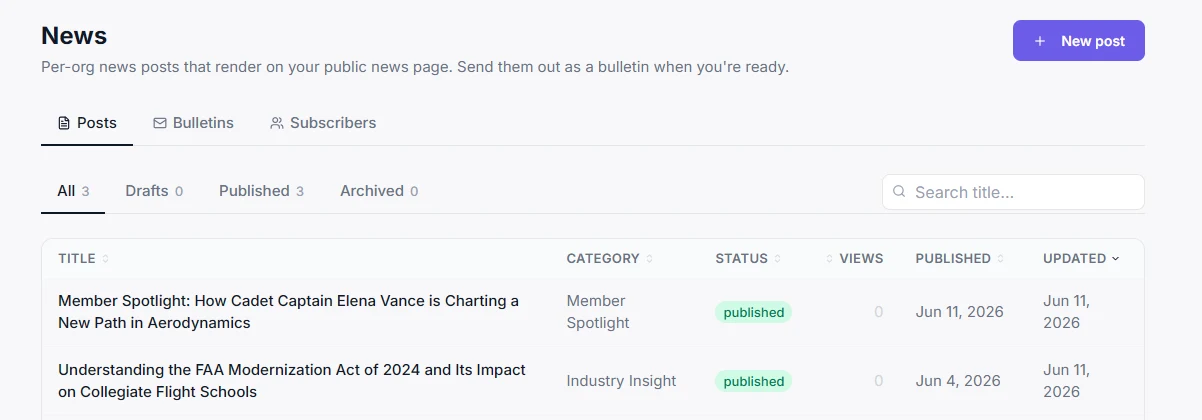 Demo titles hidden
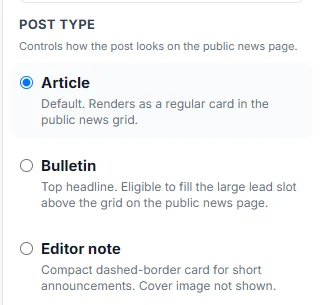
5 of 5 jobs covered
Readers see one email. Whoever sends it carries five jobs underneath, from the blank page to the results page. Then the turn: one subscriber list runs through every layer, so none of them needs a second list.
One list. Write once and the same post is the email and the news page, for people who confirmed.
Hover, focus or tap a layer to read it
The same five jobs, this time as rooms in one small newsroom. Walk the floor to see where each one sits and how a single corridor reaches every door.
Five rooms, one corridor: that corridor is your subscriber list. A sign on the wall reads: opens and clicks need your own sending domain. Hover, focus or tap a room to read it.
Access is by request. A person sets you up today, so you talk to someone instead of reading documentation.
Tell us about your list: who you are, what you send, how big the list is and where it lives now. It is a short form at the foot of this page.
We create it by hand and send you a sign-in link. You cannot sign yourself up.
Import a CSV with a consent statement, add people by hand, or share your public subscribe page. Then write your first post.
Run the check, send a test to yourself, then send now or schedule it. The same news is already on your page.
Drag the torn edge, or focus it and use the arrow keys.
Demo titles hiddenFormatting broke
re: I unsubscribed
re: twice!
Check for typos
Right side: a real, cropped screenshot of the News list, with demo titles blurred. Left side: an illustration of the patchwork, no real tools named.
This sample issue has three things left in it. Click a line to jump to the block, or fix it. Then add a block of your own.
Subject: (empty)
Join us for [Event name] on [Date].
3 things to check
Sample issue, sample names. The blocks are real block types from the editor.
Type a headline and watch the same post become the email and the news card. Then subscribe a sample reader and see that only the confirmation click counts.
Type a headline and a one-line excerpt. Pick a post type.
In the email
Doors open at 6:30 in the main hall.
Read moreOn the news page
Doors open at 6:30 in the main hall.
Nothing here is sent anywhere. Press the steps in order, then try to break it.
Not on the list yet. Press Subscribe.
Illustration only. The sample reader and the post are made up. Typing, choosing and pressing are the real part: a typed address stays pending until the confirm click, and an import never adds back someone who unsubscribed.
The saving is not a speed trick. The post you publish is both the web page and the email, so there is nothing to write twice and nothing to keep in sync.
Your readers need none. Your team signs in with a link we send. Turn a badge over to see what each person does.
Six plans, by how many subscribers you have. Prices are in US dollars per month. BulletinRun is set up by hand today, so you request access and we create your account and send your sign-in link.
Asking costs nothing and takes no card. Say your list size in the form and we come back with how it would work for you.
Yes.
A typed address proves nothing. Whoever subscribes gets a confirmation email, and only their click makes them a subscriber. The same click is the only thing that brings back someone who unsubscribed.
On a page we host.
Published posts show on a public news page, with a page for each post and subscribe and unsubscribe pages. It is a page we host for you, with your posts in it.
Sometimes.
Opens and clicks need a verified sending domain of your own, with tracking on. Without that, the results page shows dashes, not zeros, so you are never shown a number that was not measured.
Yes.
Import a CSV with a statement that the people on it agreed to hear from you. Anyone who previously unsubscribed is skipped and is never put back by an import. You can also add someone by hand.
Not yet.
Today a person sets you up. You send a request, we create your profile by hand and send you a sign-in link. We do not promise how fast, and we would rather say so than pretend there is a sign-up button.
No.
A double click or a second tab sends once. A leftover [bracketed] sample line stops the send until you confirm it, and the unsubscribe link cannot be deleted from an issue.
Fill in the form and the badge builds as you type. We set up your profile by hand and send you a sign-in link. The demos above are open to you whenever you like.
Best for: Small groups and organizations getting started
Your request will name the Launch plan.
Prices in US dollars per month. We set up your account by hand and send your sign-in link.
We will read where your list lives today and come back to to set up your profile and send you a sign-in link.
Until then, nothing changes and nothing is charged. The demos above are open to you whenever you like.
BulletinRun is a MemberRun sub-brand. Screens show demo data and the sample names are made up. Opens and clicks need a verified sending domain. Photography: stock (Pexels, Mixkit).